
Menu translator: translate a menu image and keep the design
People search for a menu translator for two different reasons. Diners abroad want to understand a menu in front of them, and a camera app is built for that. Restaurants want a translated menu they can print, post on their website or send to a delivery platform, without asking a designer to rebuild it. This page is mainly for the second group.
In short
- Reading a menu: a camera app (Google Translate, Papago) translates it on the spot.
- Publishing a menu: you need a translated copy of the design itself. TranslateMyImage rebuilds the menu image with the translated text in the same layout.
- Before printing: check prices, allergens, dish names and accents yourself. The checklist below covers what to look for.
Reading a menu vs publishing a translated menu
| Need | Best fit | What you get | Watch out for |
|---|---|---|---|
| Understand a menu at the table | Camera translation in a phone app | Translated text over the camera view or a photo | Made for reading on the spot |
| Translate a menu photo once | Google Translate website, Images tab | The photo with translated text, downloadable | Small or stylized text may be less accurate (Google help) |
| Give guests a translated menu in your design | TranslateMyImage | A new image with the translated text in the original layout | Generated output: review every line |
| Legal, medical or allergen-critical wording | A professional translator | Reviewed translation | Cost and turnaround |
How to translate your menu image
- Export one page per image. From Canva, Illustrator or your print file, export each page as JPG or PNG. Keep each file under 10 MB. A flat scan works too, as long as it is sharp and straight.
- Upload it to the image translator. Set the source language or leave it on Auto-detect.
- Choose the target language. Pick Spanish, English or one of the other options: French, German, Italian, Portuguese, Japanese, Korean and Chinese.
- Review the result line by line with the checklist below.
- Download and use it. For a multi-page menu in several languages, paid plans include batch translation: up to 10 files per run, each in several target languages, up to 50 translated images in total, with a ZIP download.
What our own sample shows
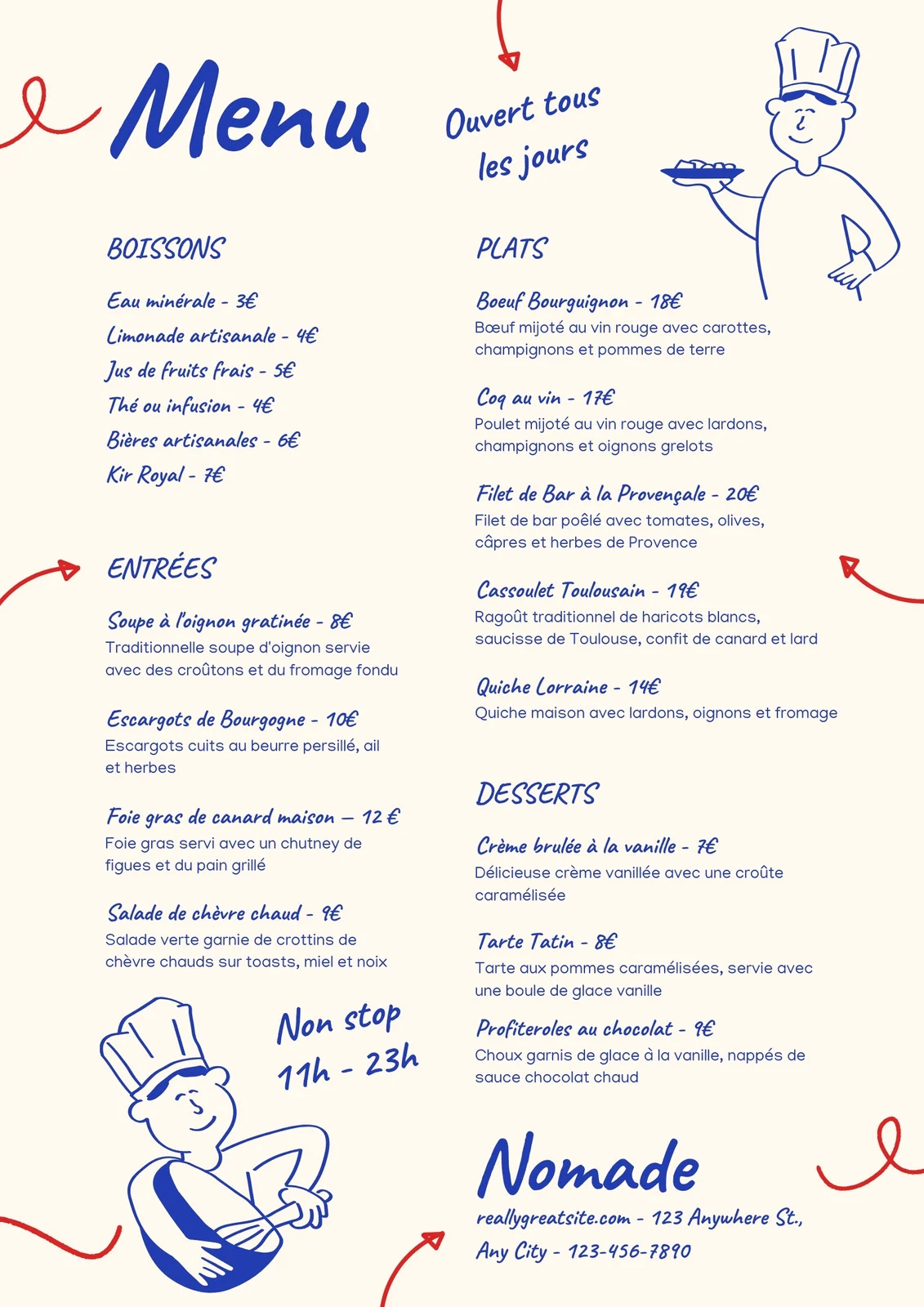
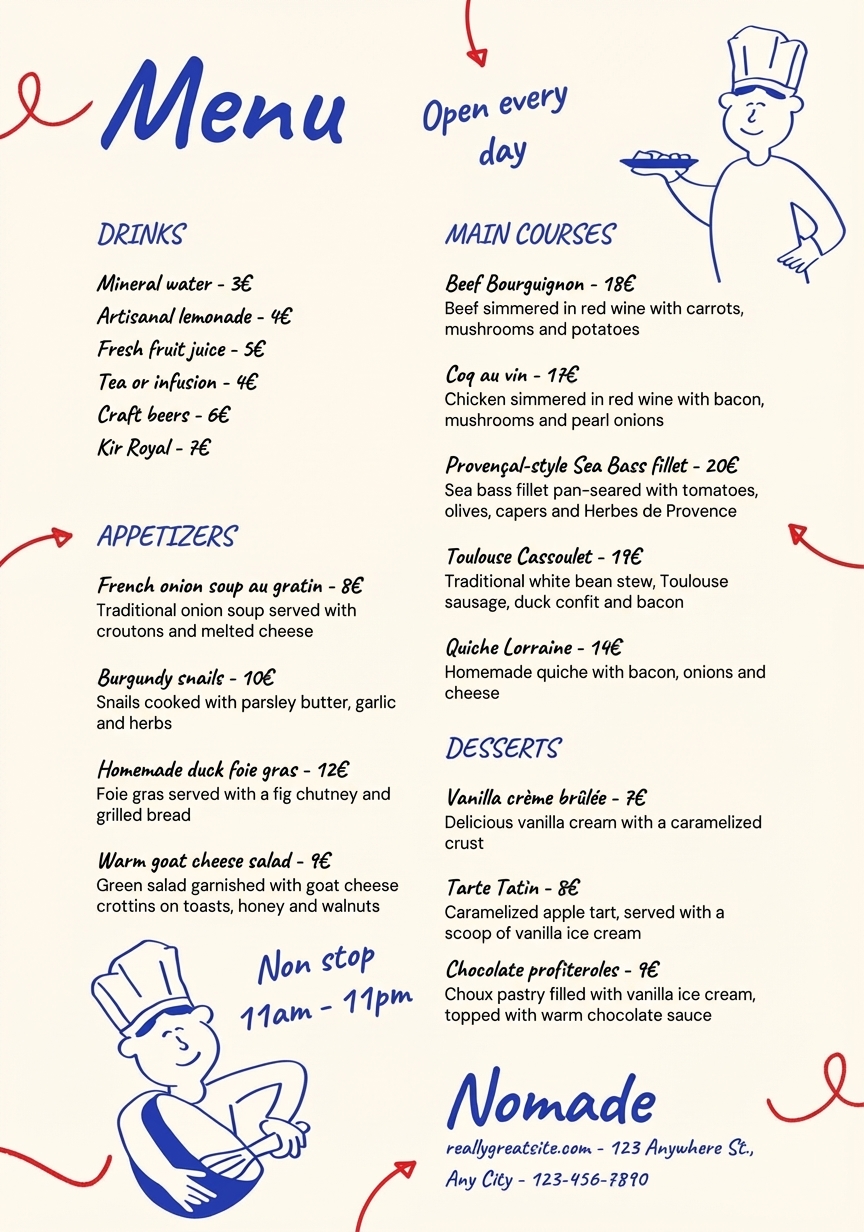
The menu below is the sample we use on our site. The English version was generated from the French original.
What worked:
- The layout, handwritten-style fonts, illustrations and chef drawings stayed in place.
- Prices were kept, and the opening hours were adapted to English conventions ("11h - 23h" became "11am - 11pm").
- Several well-known French names were kept ("Coq au vin", "Quiche Lorraine", "Tarte Tatin", "Kir Royal"), while section titles and descriptions were translated.
What a reviewer should check before printing:
- In the original, dish and drink names and their descriptions are blue like the headings; in the translation they came back black, while the headings stayed blue, and the descriptions are set in a heavier sans-serif. The layout is intact, but the change is visible.
- "Boeuf Bourguignon" became "Beef Bourguignon", a half-English name. Decide whether to keep the French name, as the translation does for "Coq au vin" and "Quiche Lorraine".
Neither point changes the meaning, but both are visible to an attentive reader. Differences like these are why every generated menu needs a human read before it reaches guests.
Menu translation checklist
Prices, currency and numbers
- Compare every price with the original. Generated images can change digits.
- Keep one price format across the menu (for example "12 €" or "12€", not both).
- Decide whether the currency symbol changes. Guests still pay in your local currency, so a translated menu for visitors can keep it.
Dish names: keep, translate or explain?
| Original item | Usually best | Example |
|---|---|---|
| Signature or regional dish | Keep the name, add a short description | "Tacos al pastor — marinated pork tacos with pineapple" |
| Generic item | Translate | "Grilled chicken salad" → "Ensalada de pollo a la parrilla" |
| Brand or house name | Keep as is | "The Nomade Burger" |
| Cooking term with no equivalent | Keep and explain once | "Confit (slow-cooked in its own fat)" |
Allergens and dietary labels
Do not rely on an automatic translation for allergen information. Check each allergen, "vegan", "gluten-free" or "spicy" label with your kitchen, and follow the labeling rules that apply where you operate.
Text length
Text translated from English into European languages usually runs longer, especially short labels: the W3C cites IBM figures in which English strings of up to 10 characters end up, on average, two to three times as long (200–300%) (W3C, Text size in translation). Short section titles such as "Drinks" or "Sides" fall in that range, so look closely at headings.
One translated copy or a bilingual menu?
TranslateMyImage produces a translated copy of each menu page. That suits a separate Spanish or English menu, a QR-code menu with a language switch, or a delivery app listing. A side-by-side bilingual menu is a different layout, and the translator has no bilingual option: you can use the translated copy as the text source and lay out the bilingual page in your design tool.
If you are traveling
For a quick read at the table, a camera app is faster. Upload a photo here when you want a full translated copy you can keep, zoom into and share with the people you travel with.
Translate your menu image
Upload one menu page, choose a language and review the translated copy before you print it.
Related: translate a flyer into Spanish · translate images to Spanish · plans and commercial use
Frequently asked questions
Can you Google Translate a menu?
Yes for reading it. The Google Translate app's camera and the website's Images tab show the translated text over the photo, and the website's "Download translation" button saves that result. Google notes that small, unclear or stylized text may be translated less accurately. If you need a copy of your menu design to print or post, use a tool that rebuilds the image with the translated text and review it before use.
How do I translate a menu from a photo?
Take a sharp, straight photo of one page (or export the page from your design file as JPG or PNG under 10 MB), upload it, pick the target language and download the translated image. Check every price, allergen and dish name against the original before you share it.
Can I use a translated menu in my restaurant?
Commercial use requires a paid plan (Pro or above). The free Basic plan is for personal use only, and credit packs add credits without changing that. You remain responsible for the accuracy of prices, allergen information and any legally required wording.
Which languages can I translate a menu into?
The uploader translates into English, Spanish, French, German, Italian, Portuguese, Japanese, Korean and Chinese. The source language can be set manually or left on Auto-detect.
Should dish names be translated?
Not always. Well-known names (coq au vin, ramen, tacos al pastor) can be kept and followed by a short description in the guest's language. Translate generic items such as "grilled chicken salad".