
Translate Arabic images to English
To translate an Arabic image to English, upload it, leave the source language on auto-detect and choose English. Arabic is not in the source-language list of the image translator, but auto-detect needs no source: the model is asked to translate all the visible text into English and keep the layout, and you get a new image with the English text in place. Arabic runs right to left, has its own digits and is written in many styles, so a few checks matter more than usual. They are listed below. For English → Arabic, see translate images into Arabic.
In short
- How: upload the image, keep auto-detect as the source, choose English, then review.
- What to check: the reading order of steps and arrows, every Eastern Arabic digit, the spelling of names, and whether the text is Modern Standard Arabic or a dialect.
- When to involve a person: decorative calligraphy, religious and literary texts, handwriting and official documents.
How to translate an Arabic image
- Use a sharp, straight image. Arabic letters change shape depending on their position in a word, and the dots above and below them distinguish different letters. A blurry photo can lose exactly those dots. JPG, PNG or WebP, up to 10 MB.
- Open the image translator and leave the source on auto-detect.
- Choose English. On a wide screen you can also pick the mode: Default mode for signs, letters and screenshots, Marketing for ads and posters.
- Download the result (without an account, you get it by email) and review it with the checklist below.
For chat screenshots from WhatsApp or other apps, see the screenshot translator. To read Arabic on the spot with your camera, see how to translate a picture on your phone.
Right to left in, left to right out
The translator is asked to keep the layout, so each block of text should stay where it was. A design built to be read right to left should keep running right to left after translation, while the English inside each block reads left to right. Look closely at:
- Numbered steps and timelines that start on the right.
- Arrows that point left to mean "next".
- Before/after pairs and comparison columns ordered for an Arabic reader.
The translator is not asked to mirror the design. If the English version must flow left to right, rearrange it in your editor.
Lines that mix scripts deserve a second look too. Brand names, emails and phone numbers in Latin characters sit inside right-to-left text; check that none of them was reordered or reversed.
Numbers: two sets of digits
| Western | 0 | 1 | 2 | 3 | 4 | 5 | 6 | 7 | 8 | 9 |
|---|---|---|---|---|---|---|---|---|---|---|
| Eastern Arabic | ٠ | ١ | ٢ | ٣ | ٤ | ٥ | ٦ | ٧ | ٨ | ٩ |
Many Arabic images use Eastern Arabic digits, and each one is easy to misread. ٥ (five) looks like a Western zero. ٠ (zero) is a small dot that a blurry photo can turn into a full stop or lose. Persian uses a variant set in which 4, 5 and 6 have different shapes (۴ ۵ ۶), and Urdu has its own forms for some digits. Numbers are written left to right even inside Arabic text, so ١٥٠ is 150. Compare every price, phone number and quantity digit by digit.
Dates may also follow the Hijri calendar, marked هـ, alongside Gregorian dates marked م. Check that a Hijri year has not been presented as a Gregorian one.
Calligraphy, religious and literary text
Calligraphic styles such as Kufic, Thuluth or Diwani can stack, stretch and interlace letters for decoration. Machines can misread them, and Google's own help page on translating images warns that stylized text can lower accuracy. For Quranic verses, hadith or classical poetry, use an established published translation and cite it.
Modern Standard Arabic and dialects
Signs, official notices and news graphics are usually in Modern Standard Arabic. Ads, social media posts, memes and chat messages can be in a dialect (such as Egyptian, Levantine, Gulf or Maghrebi), with words and spellings that differ from the standard language. A translation of dialect can come out literal or miss a joke. If the meaning matters, ask a speaker of that dialect.
Names and transliteration
محمد can be written Muhammad, Mohammed, Mohamed or Mohammad, and the article ال can become al-, el- or il-. There is no single correct spelling: for a person, use the spelling in their passport; for a business, use its own Latin name if it has one.
Example: a layout kept across scripts
This sample from our site, generated with our image translator, goes the other way, English → Arabic. It shows what happens to a layout when the script changes direction, which is the same thing to check when you go from Arabic to English.
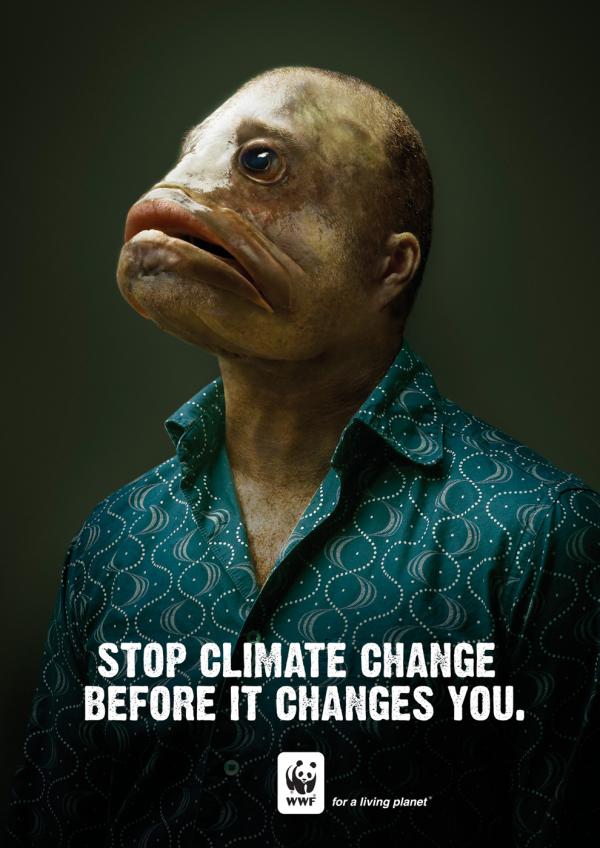
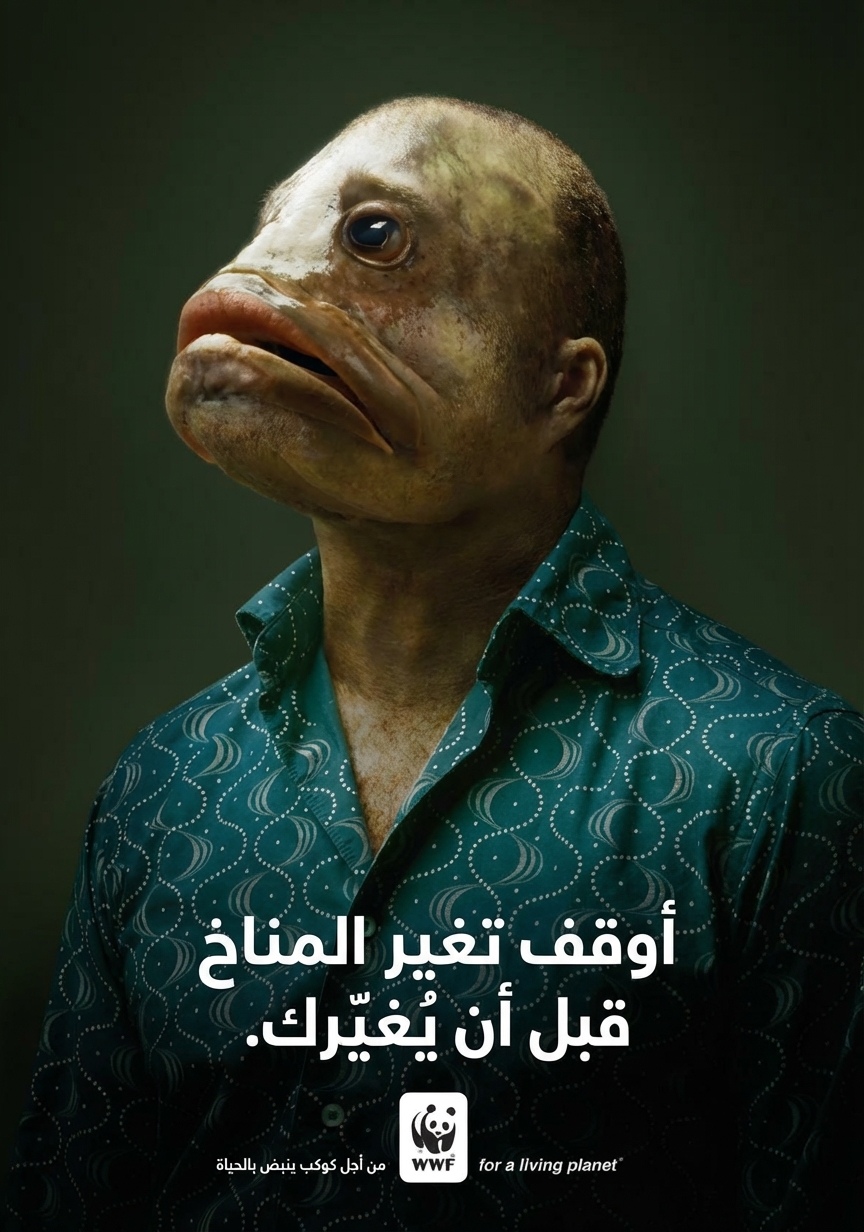
- The photo and the WWF logo look the same as in the original.
- The two-line headline became two centered lines of Arabic, read right to left, with the full stop at the left end.
- The condensed, distressed capitals of the original were replaced by a clean bold Arabic typeface.
- The tagline "for a living planet" stayed in English on the right of the logo, though the first i of "living" lost its dot, and an Arabic version was added on the left. A reviewer has to decide whether both should stay.
The checks are the same in the other direction: what moved, what changed style, what was kept in the original language and what was added.
Checklist for a translated Arabic image
- Every digit compared with the original, Eastern Arabic and Western.
- Steps, arrows and sequences still make sense in the English reading direction.
- Names spelled as the person or business spells them in Latin letters.
- Hijri and Gregorian dates labeled correctly.
- Nothing left in Arabic, and nothing added, unless you want it.
- For official documents (certificates, contracts, court papers), a certified translation: official uses usually require one, so check the requirements of the agency.
For other source languages, see translate images to English.
Translate an Arabic image to English
Upload a sign, letter, label or screenshot, keep auto-detect as the source, choose English and check every number.
Frequently asked questions
Can I take a picture of Arabic and translate it?
Yes. Upload the photo (JPG, PNG or WebP, up to 10 MB), leave the source language on auto-detect and choose English. You get a new image with the English text in the original layout. Check numbers, names and the order of any steps before you rely on it.
Can ChatGPT translate an image?
ChatGPT accepts uploaded images, so you can ask it what the Arabic text says and read the answer in the chat. That can be enough to understand a message or a sign. For an image with the English text in place, ChatGPT Images can generate a new version from your request, while an image translator is asked only to translate the text and keep the layout. Check the result either way.
How do I translate an Arabic image with Google Translate?
On the Google Translate website, open the Images tab, set From to Detect language and To to English, upload the image and use Download translation to keep the result. Google notes that small, unclear or stylized text can lower accuracy, and calligraphy is stylized text.
Can it translate Arabic calligraphy or Quranic verses?
Decorative calligraphy can be misread by machines, because letters are stacked, stretched and interlaced. For Quranic verses, hadith and classical poetry, use an established published translation rather than a generated one.