
Translate Manga Online Effortlessly
Translate manga images with speech bubbles, vertical text, and sound effects. Review generated text and layout against the original panel.
No credit card required.
At a glance
How to translate a manga page from Japanese to English
Upload the page as an image, keep auto-detect or choose Japanese as the source language, and choose English as the target. TranslateMyImage returns a new image of the page with the text in the speech bubbles, captions and sound effects rewritten in English, generated to keep the art and panel layout.
The text is read, translated and redrawn in one pass, vertical Japanese included. Compare each panel with the original before you share the page: check names, dialogue and sound effects.
- Languages
- 9 languages, in either direction: English, French, Spanish, German, Italian, Portuguese, Japanese, Korean, and Chinese.
- Files
- One page per image file (JPG, PNG, WebP or another image format), up to 10 MB. PDF, CBZ and EPUB files are not accepted: export the pages as images first.
- Whole chapters
- Batch translation, from the Pro plan, takes up to 10 pages at a time.
- Price
- Each page uses one credit. The Basic plan is free with 3 credits a month; Pro costs $9.90 a month for 100 credits.
Compared
Best manga translator to translate manga pages online: how to choose
The best manga translator depends on where your pages are. To read raw chapters on the websites where you find them, a browser extension that translates images in place, such as Torii Translate, is the fastest route. To translate page files you already have and download each one as a new image, with the dialogue redrawn in the speech bubbles, use an upload tool such as TranslateMyImage.
| Criterion | TranslateMyImage | Torii Translate |
|---|---|---|
| How you use it | Upload page images on the website, from a computer or a phone browser. No extension to install. | Browser extension (Chrome, Edge, Firefox, Safari and others) that translates images on the pages you read, plus a web app for uploads. |
| Text in the bubbles | Returns a new image of the page with the dialogue, captions and sound effects written in the target language. | Erases the original lettering and sets the translation inside each bubble, according to its site. |
| Languages | 9 languages, in either direction. | More than 140 languages, according to its site. |
| Files and chapters | JPG, PNG or WebP pages up to 10 MB each; batch translation of up to 10 pages at a time from the Pro plan. | Images, ZIP or PDF chapters in the web app; export as images, ZIP, PDF or layered PSD. |
| Price | One credit per page: 3 free credits a month, or Pro at $9.90 a month for 100 credits. | Free credits at sign-up (amount not stated), then one-off credit packs from $5.99 for 2,500 credits that do not expire; about one credit per manga page, according to its site. |
| API | Yes, from the Pro plan. | Yes. |
Pick a browser extension when you want to read chapters where they are published. Pick TranslateMyImage when you want the translated pages as files you keep, in one of 9 languages, and the same account for other images such as product photos, ads or documents.
Torii Translate facts from toriitranslate.com and its pricing page, checked on October 27, 2026. Prices and features can change.
Simple Process
How It Works

Upload your manga page or panel

Choose the source and target languages, then translate
Download your translated manga
See It In Action
Japanese to English Manga Translation
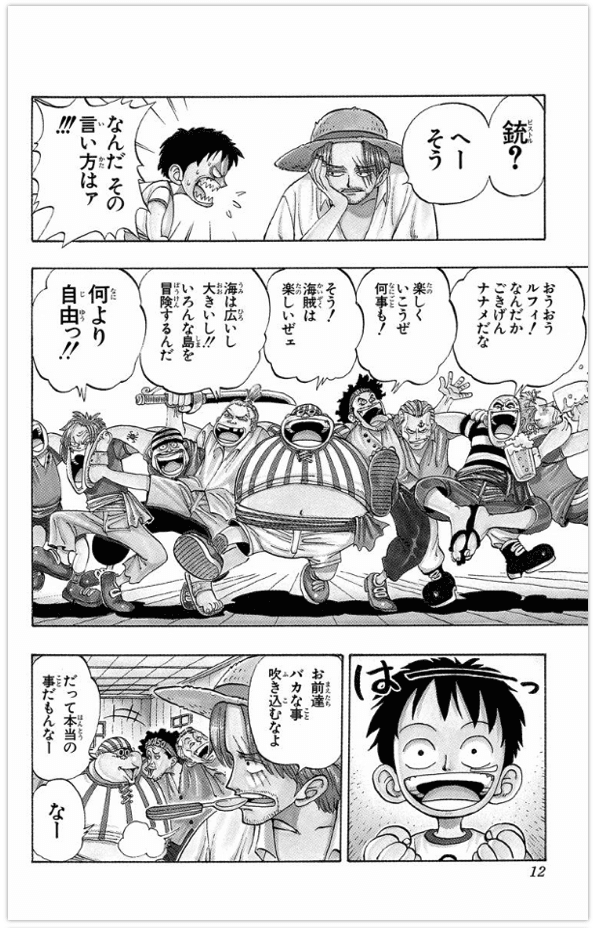
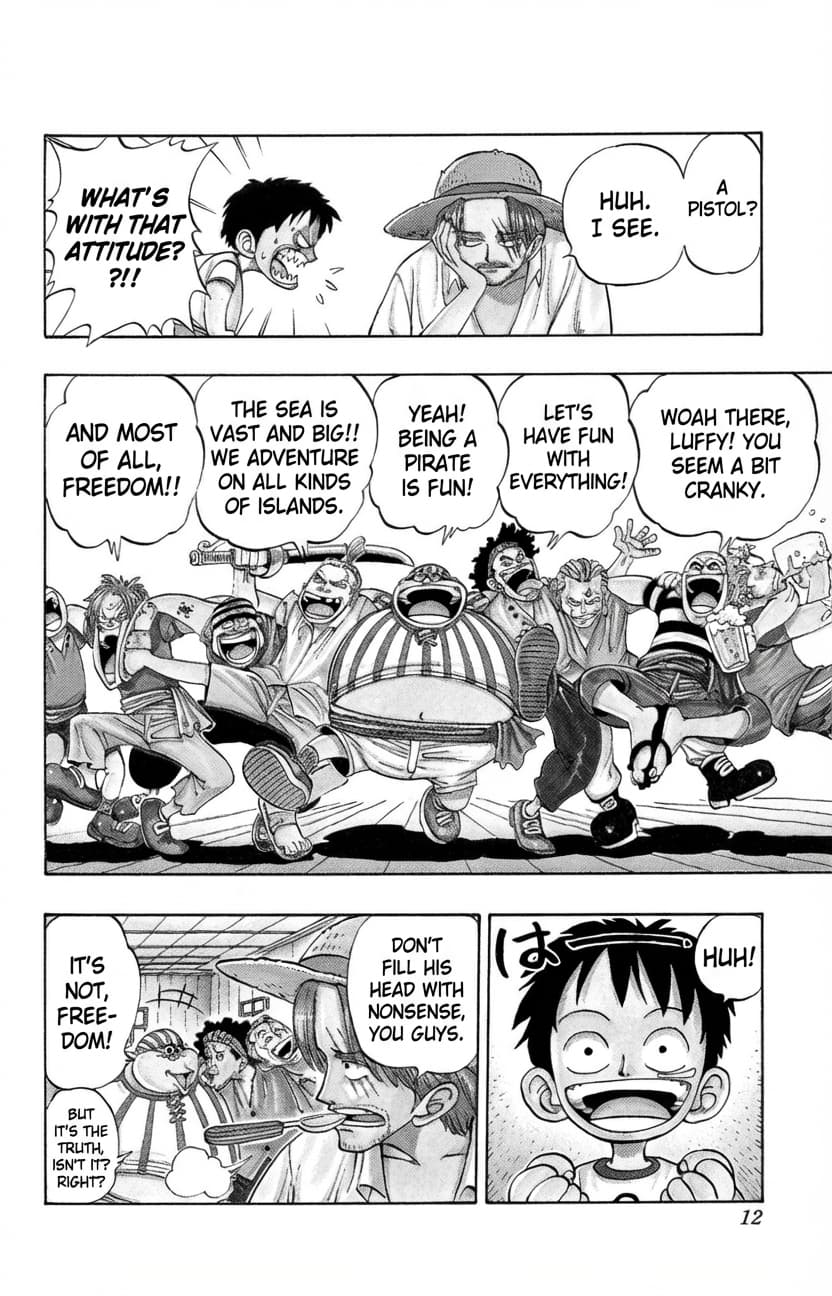
This sample shows a manga page in Japanese and its English translation. Results can vary with lettering and panel layout; review the translation before using it.
Speech Bubbles
The AI rewrites the text inside each speech bubble, including curved or stylized lettering. Check the result against the original panel.
Vertical Text
Pages with vertical Japanese text can be translated. Check the reading order and line breaks.
Manga Translation Features
Built for Manga Pages
Our manga image translator understands the unique challenges of translating Japanese manga, from speech bubbles to vertical text and sound effects.
Speech Bubble Translation
The AI reads each speech bubble in context and regenerates it with the translated text, even when the lettering is curved or stylized. Compare each bubble with the original panel.
Vertical Japanese Text Support
Manga pages with vertical Japanese text, read right to left and top to bottom, can be translated. Check the reading order and line breaks in the result.
Onomatopoeia Handling
Japanese sound effects (onomatopoeia) like ドキドキ, バーン, and ガチャン are rewritten with the rest of the page. Depending on the lettering they may be translated or left as drawn; check that they keep their visual impact.
Perfect For
Who Uses the Manga Translator
Creators and publishers translating pages they hold the rights to, and readers studying Japanese.
Your Own Comics
Translate the pages of a manga or comic you created or publish to reach readers in another language, then review the lettering before sharing them.
Language Learning
Learn Japanese naturally by reading manga. Compare original text with translations to understand context, grammar, and cultural nuances.
Publishers and Studios
Preview how a licensed title reads in another language and spot the pages whose lettering needs a closer look before localization.
Language Support
Translate to Your Language
Translate manga pages into your readers’ language. Several target languages are supported; compare each page with the original.
Popular languages
English
French
Français
Spanish
Español
German
Deutsch
Asian languages
Japanese
日本語
Korean
한국어
Chinese
中文
European languages
Italian
Italiano
Portuguese
Português
Respect the Rights Holders
Translate pages you created, publish or have permission to translate. For other works, keep the translation for your own reading or study: do not share, redistribute or sell it, and support creators by buying official translations when available. Any commercial use of a translation needs the rights holder’s permission.
Frequently Asked Questions
Everything About Manga Translation
Common questions about translating manga images online
How do I translate a manga page from Japanese to English?
Upload the page as a JPG, PNG or WebP image (up to 10 MB), keep auto-detect or choose Japanese as the source language, choose English as the target and start the translation. You get the page back with the speech bubbles, captions and sound effects in English. Compare it with the original, then download it.
What is the best manga translator to translate manga pages online?
It depends on where the pages are. A browser extension such as Torii Translate translates manga images in place on the websites you read. TranslateMyImage translates the page files you upload and returns each page as a new image with the speech bubbles, captions and sound effects in the target language, ready to download. Each page uses one credit, and the free plan includes a few pages a month.
How accurate is the manga image translator for Japanese text?
Recognition quality depends on scan resolution, lettering style and panel density: clean, high-resolution pages give the best results. Review names, dialogue and sound effects against the original before sharing the result.
Can I translate vertical Japanese text in manga?
The image translation workflow can process manga images with vertical Japanese text. Recognition and layout can vary, so review the translated panel against the original.
Does the translator handle manga onomatopoeia and sound effects?
Sound effects such as ドキドキ or バーン may be recognized or translated differently depending on the image. Check onomatopoeia and its context against the original panel.
Can I translate any manga page?
It depends on who holds the rights and on your country. Translating pages you own — your own comic, or a title you publish — raises no issue. For other works, keep the translation private and never redistribute or sell it without permission from the rights holder.
Can I translate doujinshi?
Yes. A doujinshi page goes through the same workflow as a manga page: upload one page image at a time, then review the speech bubbles and sound effects. Many doujinshi are fan works based on someone else’s characters, so the rights advice above applies: translate your own circle’s work or pages you have permission for, and keep any other translation for your own reading.
What file formats are supported for manga translation?
The current uploader accepts one image file per translation, up to 10 MB. Supported encoding can depend on the file and processing path.
Start Translating Manga Today
Use the image translation workflow to explore manga dialogue, then verify names, sound effects, and visual output against the source.