
Japanese image translator: translate Japanese images to English
Upload a photo or screenshot that contains Japanese, choose English as the target, and you get a new image with English text where the Japanese was, in the same layout. Japanese has traps that a quick translation can miss (vertical columns, tiny furigana, era-based dates), so this page also tells you what to check before you trust or share the result. Going the other way? See translate images into Japanese.
In short
- What you get: an English copy of the image with the original layout. The output is generated, so read it against the original before you rely on it.
- What makes Japanese harder: vertical text read right to left, furigana, four writing systems in one line, politeness levels, era years and two kinds of expiry date.
- When to use something else: a camera translation app to read something right now, a dictionary for a single kanji, a human translator for contracts and official papers.
What people translate from Japanese, and where to start
| Image | Typical text | Watch for | Mode or page |
|---|---|---|---|
| Snacks, cosmetics, supplements bought from Japan | 原材料名 (ingredients), 賞味期限 (best before), 使用方法 (how to use) | Dates, allergens, dosage | Default mode |
| Instruction leaflets, appliance manuals | Numbered steps, 注意 and 警告 notes | Step order, units, warning level | Technical documentation |
| Game and app screenshots | Menus, item names, dialogue | Names the official English release spells differently | Default mode, see the screenshot translator |
| Signs, posters, tickets | Station names, opening hours, 税込 prices | Place names that already have official romaji | Default mode, or Marketing for posters |
| Manga pages | Speech bubbles, sound effects | Reading order, bubble assignment | Manga / comics, see the manga translator |
| Restaurant menus | Dish names, set menus | Prices, dish names worth keeping | See the menu translator |
If you need the opposite, such as your own business card in Japanese, the bilingual Japanese business card guide covers it.
How to translate a Japanese image to English
- Start with a sharp, straight image. Furigana is much smaller than the kanji it sits beside, so in a photo of a package, move closer instead of zooming. Crop to the text you need with the crop tool. JPG, PNG or WebP, up to 10 MB. For a PDF, export or screenshot the page first: the uploader accepts images only.
- Upload it to the image translator. Set the source to Japanese or leave it on auto-detect.
- Choose English as the target language.
- Pick the mode that matches the image in the Business type menu, shown on wide screens (signed-in users can also save a default business type in their profile). Manga / comics asks the model to keep the reading flow and bubble placement, Technical documentation to keep the hierarchy and translate measurements correctly, Marketing to keep the brand voice and tone. Default mode suits everything else.
- Add your rules on the Pro plan or above. The custom AI instructions field (up to 1,000 characters) accepts notes such as "Keep product names as printed in Latin letters on the pack" or "Translate 賞味期限 as Best before and 消費期限 as Use by".
- Download and review with the checklist further down.
Five things that make Japanese images harder
Vertical text and right-to-left columns
In vertical writing (tategaki), characters run top to bottom and the columns run from right to left, as the W3C's Requirements for Japanese Text Layout describes. Manga pages use it, and so can book covers, labels and signs, sometimes next to horizontal text on the same surface. Columns read in the wrong order give sentences in the wrong order. In our sample below, the English came out as horizontal lines in the bubbles; check that the sentences still follow the original order.
Furigana, the small kana beside the kanji
Furigana (ruby) shows how a kanji is read, and it can also show a meaning: the W3C's Rules for Simple Placement of Japanese Ruby describe ruby as displaying the reading or the meaning of the base characters. In our sample below, 銃 ("gun") carries the reading ピストル ("pistol"), and the English says "A PISTOL?". In a blurry photo, furigana is hard to tell apart from the main text: check that it did not turn into extra words in the English.
Four writing systems in one line
A single label can mix kanji, hiragana, katakana and Latin letters, as in "ビタミンCを1000mg配合" (contains 1000 mg of vitamin C). Katakana loanwords look English but often mean something else: マンション is an apartment or condo, not a mansion; コンセント is a power outlet; クレーム is a complaint. Check that the English uses the Japanese meaning.
Politeness that English does not mark
Japanese notices often use very polite forms, and a literal translation can sound stiff ("We humbly ask that you kindly refrain from..."); plain English ("Please do not...") is usually right. Name suffixes such as さん, 様 or 先生 have no single English equivalent: decide whether to keep them or drop them, and say so in the custom AI instructions (Pro plan or above).
Dates, eras and prices
- 2026年10月3日 is 3 October 2026. Documents and labels can also use era years: the Reiwa era has been used since 1 May 2019 (Prime Minister's Office), so 令和8年 is 2026.
- Food labels separate 消費期限 (use by, a safety limit) from 賞味期限 (best before, a quality limit); neither should become a vague "expiry date". The Consumer Affairs Agency's own example prints a best-before date as "25.12.1" (CAA, PDF in Japanese). The order is year.month.day, and the year can be Western or Reiwa: Osaka Prefecture's guide lists 令和5年11月1日, 5.11.1, 2023.11.1 and 23.11.1 as ways to write the same date (Osaka Prefecture, in Japanese).
- Prices use ¥ or 円, with 税込 (tax included) or 税抜 (before tax). 1万円 is ¥10,000: count the zeros.
What our manga sample shows
This is the Japanese → English sample we use on the site: the English page is our tool's output, generated from the Japanese page shown first. For a full manga workflow, see the manga translator.
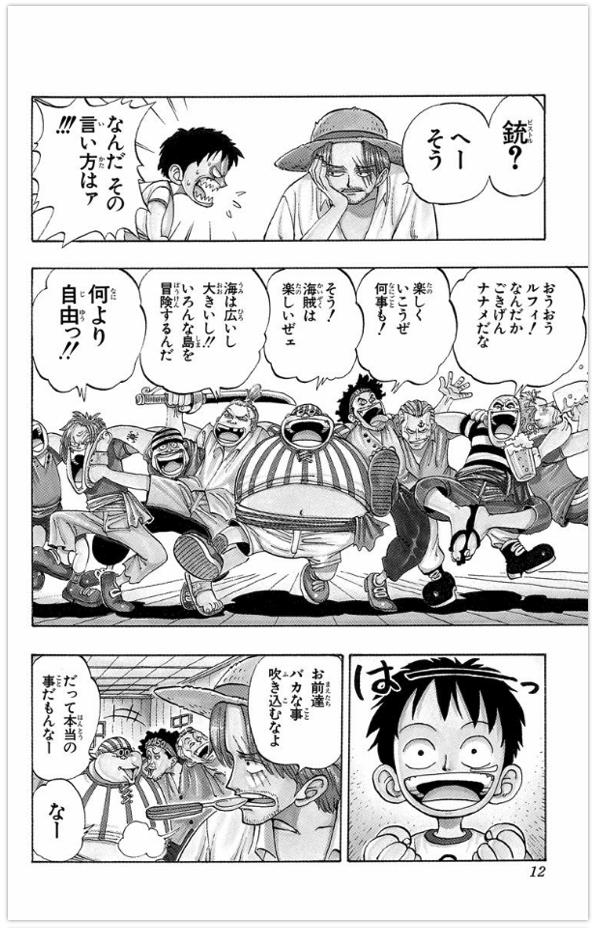
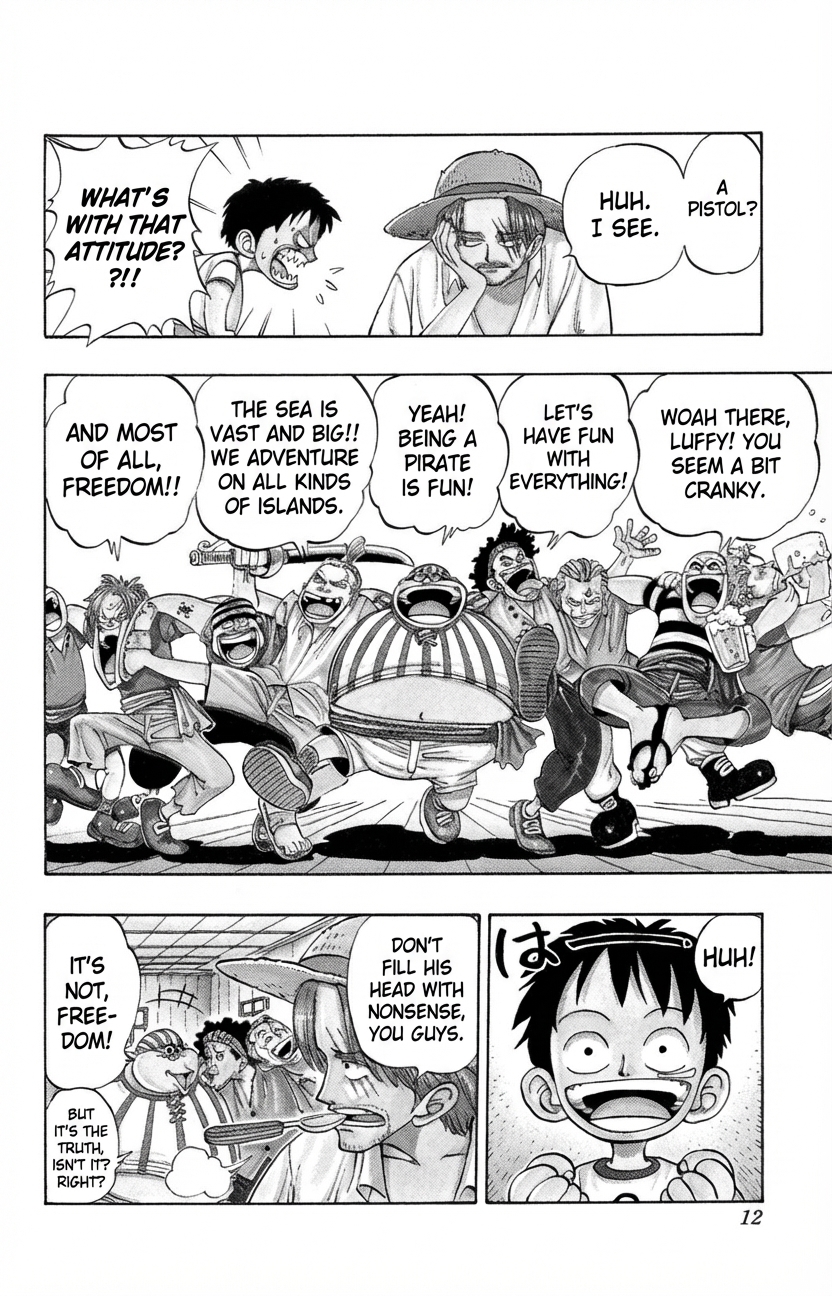
What worked:
- Every vertical bubble now holds horizontal English lettering in a comic style. The panels and page number are kept.
- The furigana-glossed 銃 became "A PISTOL?", following the reading the author chose, and 楽しくいこうぜ何事も! became "LET'S HAVE FUN WITH EVERYTHING!".
What a reviewer must fix:
- In the bottom-left panel, the large bubble now says "IT'S NOT, FREE-DOM!", a line that appears nowhere on the Japanese page. The real line (roughly "but it's the truth") was moved into the small bubble below it, together with that bubble's own "right?".
- In the last panel, the large hand-drawn は of a drawn-out "haa" sound is still in Japanese, and an English "HUH!" was added beside it, in a speech bubble the original panel does not have.
- Small details of the art were redrawn: in the bottom-left panel, the lettering on a crew member's headband is gone. Compare the drawing too, not only the text.
Every bubble looks filled, which is why these errors are easy to miss. Compare bubble by bubble, in the original reading order.
Review checklist for a translated Japanese image
- Numbers: prices, 万 amounts, mg and ml values, dosage, phone numbers and postal codes (〒) match the original digit for digit.
- Dates: era years converted correctly; best-before and use-by kept distinct.
- Names: product, brand and place names match the romaji printed on the item or the official English name. 渋谷 should stay Shibuya, not be translated word by word.
- Order: vertical columns and manga panels read right to left.
- Coverage: nothing left in Japanese (small print, stamps, furigana fragments) and nothing added.
- Safety text: 注意 (caution), 警告 (warning) and allergen lines checked against the original before you eat, apply or take anything.
When another tool is the better choice
- Reading something right now: a camera translation app on your phone is made for reading on the spot.
- One kanji, a seal stamp (hanko) or brush calligraphy: an image translator gives you a translated image, not the identity of one stylized character. A kanji dictionary with handwriting input or a person who reads Japanese can identify it.
- Copying the Japanese or English as text: TranslateMyImage returns an image, not editable text. A chat assistant or an OCR tool gives you text; our guide on whether you can ChatGPT translate images compares the options.
- Contracts, certificates, medical or official documents: use a professional translator.
- Chinese or Korean, not Japanese? Chinese uses many of the same characters but no kana: see the Chinese image translator. For Hangul, see the Korean image translator.
Translate a Japanese image to English
Upload a label, screenshot, sign or manga page, choose English and check the result against the original.
Frequently asked questions
Can I take a picture of Japanese writing and have it translated?
Yes. To read it on the spot, use a camera translation app on your phone. To get an English copy of the image itself, upload the photo (JPG, PNG or WebP, up to 10 MB), choose English and download the new image (without an account, you receive it by email). Take the photo straight on and close enough that the small kana are sharp.
Can ChatGPT translate a picture?
ChatGPT accepts uploaded photos, so you can ask it what the Japanese text says, and it answers in the chat. That suits understanding a label or a message, but OpenAI's image inputs FAQ says the model does not perform as well on text in non-Latin alphabets such as Japanese, so check what it read. If you need the picture itself with English in place of the Japanese, use an image translator and check the result.
Does it work with vertical Japanese text?
It can. In the manga sample on this page, the vertical bubbles came out as horizontal English lines in the bubbles, but one line moved to another bubble and a line that is not in the Japanese took its place. Japanese columns run from right to left, so check that the English follows that order and that no column was skipped.
How do I translate a single kanji from an image?
An image translator works on whole images: it gives you an English version of a label or page, not a dictionary entry. For one character you cannot identify, such as calligraphy, a seal stamp or a tattoo design, use a kanji dictionary with handwriting input or ask a person who reads Japanese.
Is it free to translate a Japanese image?
Without an account you can translate 2 images per 24 hours. The free Basic plan includes 3 credits a month for personal use. Paid plans start with Pro at $9.90 a month for 100 credits and commercial use; one credit is one image.