
How AI image translation works, and what to check in the result
In a JPG or PNG file, the words are part of the picture: letters and background share the same grid of pixels, and nothing records what lies behind the letters. To translate that text and keep the layout, a tool has to find the text, read it, translate it, then draw the translation in the same place, over a background it has to rebuild. Three families of tools do this in different ways. They return different things, fail in different places, and each calls for its own checks before you publish the result.
In short
- Camera and overlay translators such as Google Translate, Google Lens and Apple's Translate app draw the translation over the photo or the camera view. They are built for reading on the spot.
- OCR, inpainting and retyping pipelines detect the text, erase it, fill the gap and typeset the translation. Pixels outside the text areas stay as they were, but each step can leave marks.
- Single-pass generative models, the method TranslateMyImage uses, redraw the whole image with the translated text. The result looks the most like a finished design, but any part of it can change, so you check more than the words.
Why text in an image is harder to translate than text in a document
In a Word file or a web page, the text is stored apart from the layout. Translate it and the page reflows around the new words: a longer sentence wraps to another line, and the background never moves.
An image has no text layer to replace, so the words first have to be recognized from their shapes. The area they covered then has to be repainted, because the photo, gradient or pattern behind the letters was never stored. And the space is fixed: a longer translation has to fit in the same area, at a smaller size or on more lines.
Text recognition (OCR) on its own solves only the first part. It turns the picture into a string of characters and leaves the layout behind, and on a page with columns, captions or speech bubbles it can also get the reading order wrong. Each family of tools below adds something to OCR, or replaces it, to get the layout back.
1. Camera and overlay translators
These tools are free, on a phone or in a browser.
- Google Translate app. Point the camera at the text to see it translated, tap the shutter to freeze the view, or pick an image you already took. Camera translation works offline once the languages are downloaded (Google Translate Help).
- Google Translate website. The Images tab translates an uploaded picture, with a Copy text button for the translated text and a Download translation button for the translated image (Google Translate Help).
- Google Lens. In 2022, Google announced that Lens could blend translated text into complex images, using generative adversarial networks (GANs), the technology behind Magic Eraser on Pixel phones (Google).
- Apple's Translate app. Its camera mode shows overlaid translations that you can tap to copy, save or play, and it also translates photos from your library (iPhone User Guide).
What you get: the translation drawn over the original on your screen, and in some apps a translated image you can save. The point is to understand what the text says.
Where they fail: Google's help pages warn that small, unclear or stylized text may not translate accurately, and that accuracy depends on how clear the text is. Before you reuse a saved overlay image, check that every line was translated and that the translation does not hide part of the picture.
Good for: reading a sign, a menu or a letter on the spot. Our guide to translating a picture on your phone walks through each app.
2. OCR, inpainting and retyping pipelines
This is the classic method. It splits the job into separate steps, each one handled by its own model:
- Detect. A text detection model marks where the text is. Two published examples are CRAFT, which finds individual characters and the links between them (Baek et al., CVPR 2019), and DBNet (Liao et al., AAAI 2020). The output is a mask: a map of the pixels that belong to letters.
- Read. OCR turns each detected region into characters, and a layout step decides in which order to read the blocks.
- Translate. Each block of text goes to a machine translation engine, usually as plain text, without the picture.
- Erase and fill. The masked pixels are removed and an inpainting model paints the gap from the surrounding area. Earlier inpainting methods often produced distorted structures or blurry textures, which Yu et al. (CVPR 2018) addressed by letting the model borrow detail from distant parts of the image. LaMa (WACV 2022) was designed for large masks, and its authors note that inpainting systems still struggle with large missing areas, complex geometric structures and high-resolution images.
- Typeset. A renderer chooses a font, a size, a color and line breaks, and fits the translation into the area the original text occupied.
The open-source manga-image-translator project shows the whole chain: you choose a text detector (CRAFT is one option), an OCR model, a translator (DeepL, ChatGPT or an offline model, among others), an inpainter (LaMa variants are listed) and a renderer that can set text horizontally or vertically.
What you get: a translated image file. In a typical pipeline, pixels outside the text masks are left exactly as they were, and some tools keep the translated text so you can correct a line and render it again.
Where it fails: each step passes its mistakes on to the next one.
- Text the detector misses (curved, stylized, vertical, low in contrast or very small) stays in the source language.
- A mask that is too tight leaves faint outlines of the old letters; one that is too wide smears the details around them.
- Inpainting is easy on a flat color and hard on photos, gradients, faces and fine patterns, where it can leave a blur or a repeated texture.
- The renderer may fall back to a generic font, shrink the text until it is hard to read, or break lines in odd places. Arabic letters must be joined to their neighbors, so a renderer without Arabic shaping prints them as isolated letters.
- The translation engine never sees the picture, so a word like "Home" gets the same translation on a website button and in a caption about a house.
3. Single-pass generative regeneration
This is the method TranslateMyImage uses. An image model receives the picture and an instruction, and it generates a new image in which the text is in the target language. Reading, translating and redrawing happen inside the model, in one pass. There is no mask and no separate font: the letters and the background behind them are drawn together, like the rest of the image.
The instruction our translator sends asks the model to translate all visible text into the chosen language, keep the meaning and tone, keep the layout, hierarchy, typography, colors and design, change the length of the wording only when visual balance requires it, and add or remove nothing. Modes add instructions for marketing visuals, manga and comics, or technical documentation, and from the Pro plan a custom instruction of up to 1,000 characters can list names to keep or terms to use.
What you get: a new image file, with no text layer to edit. Its pixel size can differ from the original.
Where it fails: since the model redraws the whole picture, a change can appear anywhere in it. Logos, faces, product shapes, textures and small print can come back slightly different. Digits and names are redrawn like any other letters, so they can be altered or reformatted, words can be misspelled, and some text can stay in the source language. OpenAI's guide to its own GPT Image models lists the same kind of limits: the models can still struggle with precise text placement and clarity, and with placing elements precisely in layout-sensitive compositions (OpenAI). Two runs on the same image can also give different results.
An example: an English poster translated into Arabic
This sample from our site was generated by our image translator, from English into Arabic.
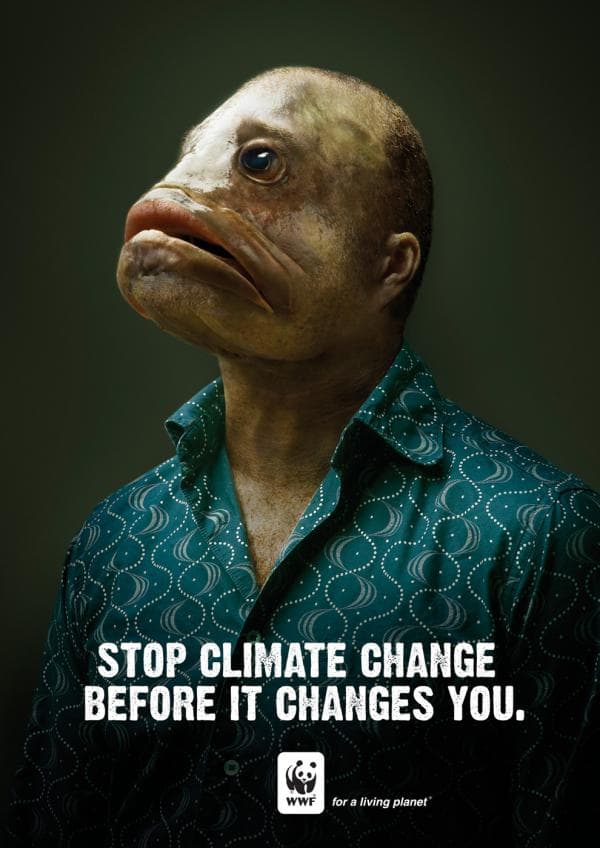
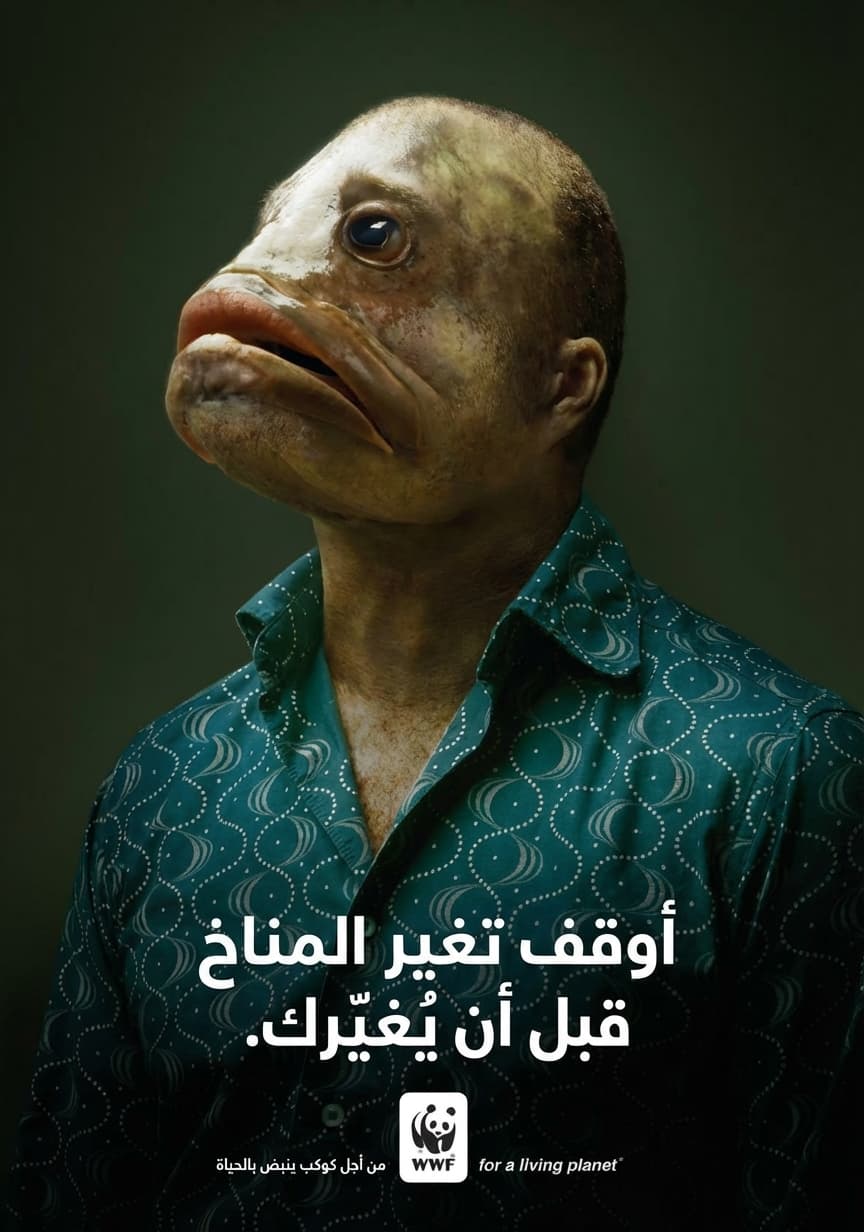
What a reviewer sees when comparing the two:
- The photo and the WWF logo look the same as in the original. The file came back at 864 × 1232 pixels instead of 600 × 848.
- The two-line headline became two centered lines of Arabic, read right to left, with the full stop at the left end.
- The condensed, distressed capitals were replaced by a clean bold Arabic typeface.
- The tagline "for a living planet" stayed in English, and the first i of "living" lost its dot. An Arabic version was added on the left of the logo, where the original had none.
These are typical of a regenerated image, and they are why the checks below cover more than the words.
What to check in a translated image
Whatever the method, compare the result with the original side by side, at full size, one area at a time. These are the places where errors hide.
- Names and brands. People, places, products and brands should stay as written unless you want them translated. Check that none was translated literally or transliterated. On TranslateMyImage, a custom instruction on the Pro plan can list the names to keep.
- Numbers, prices, dates and units. Compare every digit. Formats can change with the language: 3.400 can become 3,400, a currency symbol can move, a unit can be abbreviated differently. Decide whether each change is a correct adaptation or an error.
- Small text. Legal lines, footnotes, labels on diagrams and taglines are the first to be skipped, garbled or left in the source language.
- Text that gets longer. The W3C's article on text size in translation cites IBM averages for English translated into European languages: strings of up to 10 characters come out at 200 to 300% of their length, strings of over 70 characters at about 130%. The shorter the text, the larger the expansion, and German compounds may not wrap at all. Look for text that overflows its area, type shrunk until it is hard to read, and wording cut so short that information is gone.
- Right-to-left scripts. Arabic is written from right to left, its letters join their neighbors, and numbers keep a left-to-right order inside the line (W3C, Arabic & Persian Layout Requirements). Hebrew also runs right to left. Check the order of the lines, that the letters are joined, that punctuation sits at the correct end, and that arrows and numbered steps still read in a sensible direction. The Arabic image translator page has a longer checklist.
- Vertical text. Japanese can be set in vertical columns, with characters running top to bottom and lines running right to left (W3C, Requirements for Japanese Text Layout). Manga dialogue is often set this way. Check that speech bubbles were read in the right order, that a horizontal translation fits a narrow bubble, and that sound effects drawn into the art were handled the way you want. More on the manga translator page.
- Everything that is not text. With a generative method, look at logos, faces, product shapes and the background. Scan every QR code and barcode: a redrawn code may no longer scan.
- Leftovers. Look for words still in the source language, traces of the old letters, and text that was added.
Start from the best file you have: the largest version, without heavy JPEG compression. Blurry text is harder to read for every method. If the design is still editable in Photoshop, Figma, Canva or PowerPoint, translating its text layers keeps the exact fonts and a background that nobody has to redraw; our guides for Canva and PowerPoint cover that route.
Which method fits which job
| Your goal | Method | Why |
|---|---|---|
| Read a sign, a menu or a letter | A camera or overlay app | Free and immediate; Google Translate works offline once languages are downloaded |
| Copy or quote the text | OCR, or Copy text in Google Translate | You get words you can paste and edit |
| Translate a design you can still edit | The text layers in Photoshop, Figma, Canva or PowerPoint | Exact fonts, untouched background |
| Publish a flattened JPG or PNG in another language | A pipeline tool or a generative translator, then the checks above | You get a finished image file |
| Translate many images into several languages | A tool with batch or API support | One run instead of one upload per image and language |
For the last row, TranslateMyImage's batch translation takes up to 10 images per run from the Pro plan, and the image translation API is available on the same plans. For seven tools compared by what they return, see best image translators. ChatGPT can do both text and a generated image: see Can ChatGPT translate images?
Translate an image and check the result
Upload a JPG, PNG or WebP image up to 10 MB, choose a language and get a new image with the translated text in the original layout. Then compare it with the original.
Frequently asked questions
How does AI translate the text in an image?
It has to find the text, read it, translate it and draw the translation back into the picture over a rebuilt background. Camera apps such as Google Translate show the translation over the photo. OCR pipelines erase the original text, fill the gap with an inpainting model and typeset the translation. Generative image models redraw the whole image with the translated text in one pass.
Does TranslateMyImage use OCR?
Not as a separate step. A generative AI image model receives the image with an instruction to translate all visible text into the target language and keep the layout, typography and colors, and it returns a new image. No text file is produced along the way, so there is no translated text to edit afterwards: you review the image itself.
What is inpainting in image translation?
Inpainting fills a masked area of an image with pixels that match the surroundings. OCR-based translators use it to rebuild the background where the original text was erased, before they typeset the translation. It works well on flat colors; on photos, gradients and fine patterns it can leave a blur or faint traces of the old letters.
Why are numbers or names different in my translated image?
Generative models redraw every character, digits included, and can also adapt formats, for example turning 3.400 into 3,400. OCR pipelines can misread a digit or a stylized letter. Compare every name, price, date and unit with the original before you publish. On the TranslateMyImage Pro plan, a custom instruction can list the names that must stay unchanged.
Can an image translator handle Arabic or vertical Japanese text?
Often, but these are the results to check first. Arabic runs right to left, its letters join, and numbers keep a left-to-right order. Japanese is often set in vertical columns read from right to left. Check the reading order, the joined letters and the line breaks. TranslateMyImage reads both as source text, and Arabic is one of its 45 target languages, through the language pages.
Is it better to translate the source file than the image?
Yes, when you have it. If the design is still editable in Photoshop, Figma, Canva or PowerPoint, translating its text layers keeps the exact fonts and leaves the background untouched. An image translator is for when you only have the flattened JPG or PNG, or when rebuilding every file by hand would take too long.
About the author
Founder and developer of TranslateMyImage, an online AI image translator. He writes about translating text in images, OCR and e-commerce localization.
View author profileRelated Articles
Can ChatGPT translate images?
Yes: upload an image to ChatGPT and ask for a translation, and you get text. A translated image is a different job. Prompts, limits and privacy.
How to Localize Amazon Listing Images for New Marketplaces
Which Amazon listing images to translate for a new marketplace (secondary images, A+ modules, size charts, not the main image), a workflow for one ASIN, and what to check before upload.
Best image translators in 2026: 7 tools compared by what they output
Google Translate, Apple Live Text, DeepL, Papago, Canva, ChatGPT and TranslateMyImage compared on output, free use, batch and API. Documented features only.