
Can ChatGPT translate images?
Yes. In a ChatGPT conversation, attach an image and ask ChatGPT to translate the text in it: the reply is the translation, as text. If what you want is the image itself with the text in another language, that is a different request. ChatGPT then has to generate a new image, which can change more than the words. This guide covers both, with prompts that make mistakes easier to spot and the limits to keep in mind.
In short
- To understand an image: upload it and ask for a transcription plus a translation. You can also ask for context, such as what a dish is or what an idiom means.
- To get a translated image: ChatGPT Images generates a new version of the picture, and its edits can reach beyond the text. Check every detail, not just the text.
- Watch for: small, blurry or non-Latin text, numbers and names, and what you upload in the first place.
How to translate the text in an image with ChatGPT
- Open a chat on chatgpt.com or in the ChatGPT app.
- Select +, then Add photos & files, or drag the image into the message box, or paste a screenshot.
- Ask for what you need, using one of the prompts below.
- Compare the answer with the image, especially numbers and names.
According to OpenAI's image inputs FAQ, image inputs are available on Free and paid plans, subject to usage limits, on the web and in the mobile apps. The FAQ lists PNG, JPEG and non-animated GIF files, up to 20 MB per image.
Three prompts that make mistakes easier to spot
The most useful habit is to ask for a transcription before the translation. You can then see what ChatGPT actually read and spot a misread word before it turns into a wrong sentence.
Any image with text:
Transcribe all the text in this image exactly as written, line by line, in the original language. Then translate each line into English in a two-column table. If a word is unclear, write [unclear] instead of guessing.
A menu, a sign or a product label:
Translate this menu into English. Keep dish names in the original language and add a short English description after each one. Copy prices, weights and allergen information exactly as printed.
A letter, a form or an old document:
Translate this document into English. Keep names, dates, addresses and numbers exactly as written, and list at the end every word you were not sure how to read.
Adapt the target language and the content type. The pattern stays the same: transcribe, translate, copy numbers as they are, flag doubts.
Where ChatGPT struggles with images
OpenAI's image inputs FAQ and its vision documentation list limitations that matter for translation: the model may not perform as well on text in non-Latin alphabets such as Japanese or Korean, may misread rotated or upside-down text, and can produce incorrect descriptions. They recommend enlarging small text. In practice, that means:
- Small or blurry text is a risk: OpenAI says the model does its best with an unclear image, but the results may be less accurate. Enlarge the text before uploading, without cropping out important details.
- Numbers are read like any other text. Prices, dosages, dates and part numbers need a manual check.
- Names of people, places and brands may be transliterated or "corrected". Ask for them as written.
- Handwriting, stylized fonts and vertical Japanese text deserve extra care. A camera app such as Papago or Google Translate is a useful cross-check.
Can ChatGPT give you a translated image?
You can ask something like "Recreate this image with all the text translated into Spanish". That is a job for ChatGPT Images, the image feature in ChatGPT. OpenAI's help article on images in ChatGPT says you can upload an existing image and describe the changes you want, and ChatGPT Images generates the result. It also warns that when you select an area to edit, highlights are not always precise and edits may extend beyond the area you selected. OpenAI's image generation guide, written for developers using its GPT Image models, notes that they can still struggle with precise text placement and clarity, and with placing elements precisely in layout-sensitive compositions.
What that means for you: the result can look close to the original while details shift. Fonts, small print, logos, faces and product shapes may come out different, and translated text may be misspelled or misplaced. That is acceptable for a quick mockup. Before you publish it, compare it with the original element by element. OpenAI updates ChatGPT Images over time (the help article described ChatGPT Images 2.5 in October 2026), so test with the current version rather than relying on older screenshots or forum posts.
What about ChatGPT Translate?
OpenAI launched ChatGPT Translate, a standalone translator at chatgpt.com/translate, in January 2026. At launch, press coverage reported that it handled text only, with image and audio uploads planned for later (PCWorld, The Decoder). When we checked in October 2026, its input box offered to type, paste or upload a photo to translate. Whatever the entry point, compare the translation with the image, especially numbers and names.
And Gemini?
Gemini works the same way for reading an image. Sign in on gemini.google.com, click Add files, then Upload Files, and ask for a translation; Google's Gemini Apps Help allows up to 10 files per prompt, subject to availability, and up to 100 MB per file other than video. The answer is text, and the same checks apply.
Privacy: think before you upload
Anything you attach is sent to OpenAI's servers. Passports, ID cards, medical records, contracts and client material should stay out of a chat unless your organization allows it. If you do not want your new conversations used to train OpenAI's models, OpenAI's data controls page describes the setting: Settings → Data controls → Improve the model for everyone, turned off. The same caution applies to every online tool, including ours.
ChatGPT compared with other ways to translate an image
| Option | What you get | Is the original image the reference? | Good for | Watch out for |
|---|---|---|---|---|
| ChatGPT chat with an image | Translated text, plus explanations if you ask | Not applicable (text answer) | Understanding, context, mixed content | Small or non-Latin text, numbers |
| ChatGPT Images | A generated image based on yours | Partly: the output is generated from yours and a free-form request | Quick visual mockups | Text placement, logos, fine details |
| Google Translate website, Images tab | A translated version of your image, copyable text, a download | Yes: your uploaded image is translated, with an option to show the original text side by side | Fast, free understanding | Small or stylized text |
| TranslateMyImage | A new image with the translated text in the original layout | Yes, but the image is also generated again; the task is limited to replacing the text | Finished visuals in several languages | Generated output: check digits, logos, small print |
For more options, including DeepL and Papago, see our image translators compared, the DeepL image translation page and the Google Translate comparison. If you work at a desk, here are other ways to translate text in an image on a computer; for chat and app screenshots, see the screenshot translator.
TranslateMyImage uses an AI image model too
It would be misleading to present our tool as the careful alternative to generative AI: it also regenerates the image. The difference is the workflow. The task is limited to translating the text and keeping the layout of the image you upload, with modes for marketing, manga and comics, and technical documentation, a choice of 9 target languages in the uploader and, from the Pro plan, batch runs and an API. The output still needs the same review.
Here is a sample from our demo files: an English aircraft specification sheet, and the Japanese version our tool generated from it.
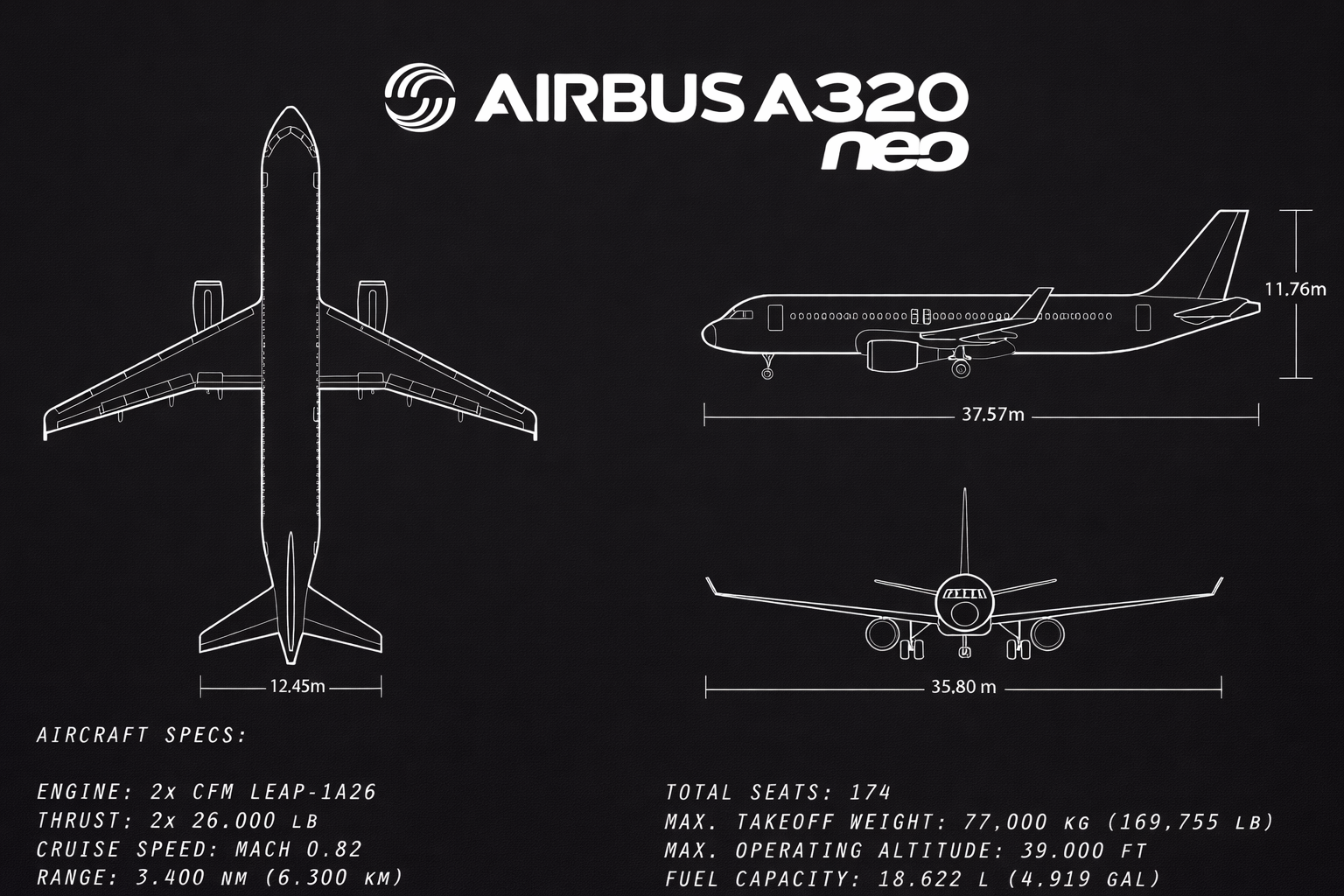
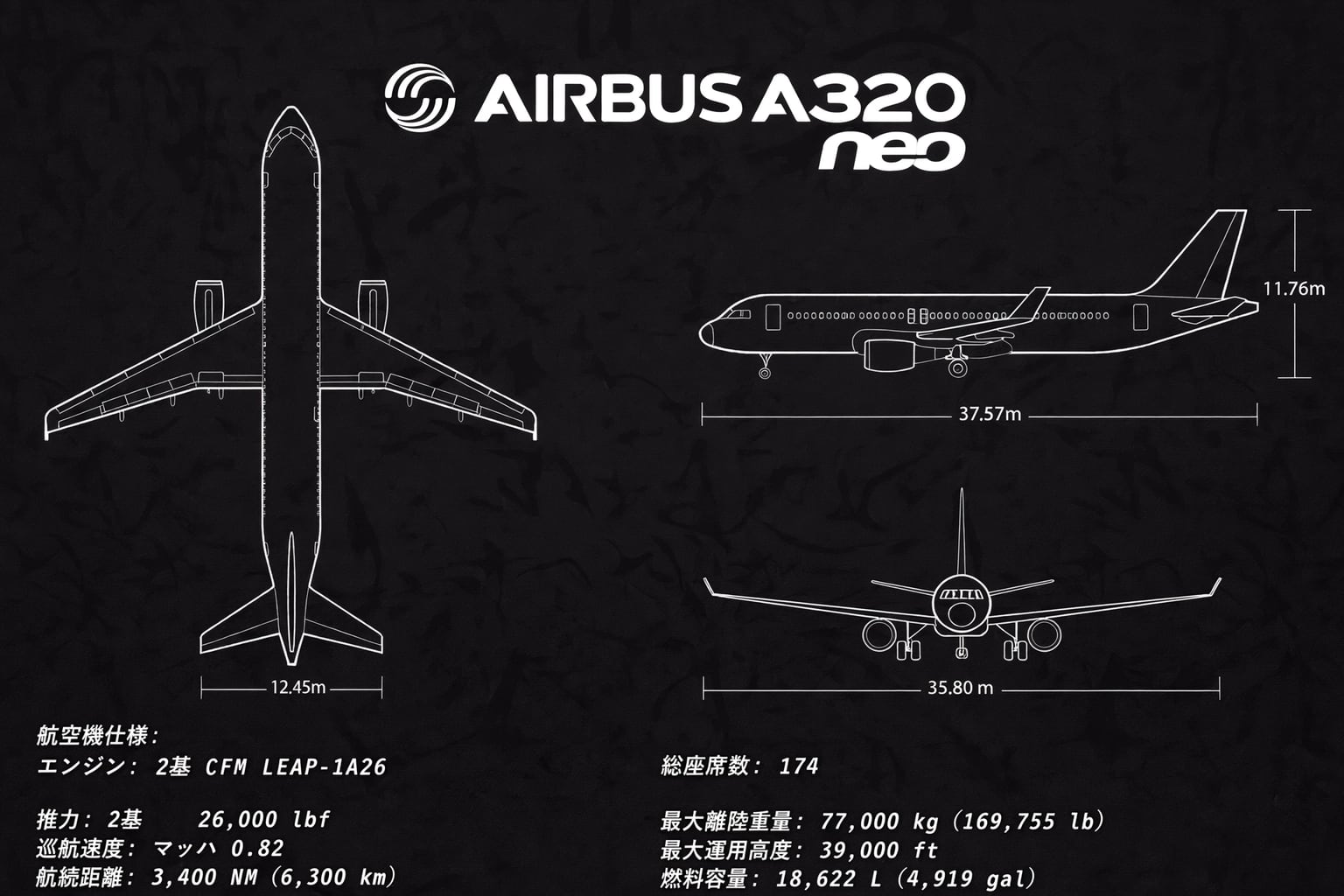
What carried over: the three drawings, the dimension lines and every value (engine model, thrust, range, seats, weights). The labels were translated, for example "Aircraft specs" became 航空機仕様 and "Engine" became エンジン.
What a reviewer has to notice:
- Number formats changed. "3.400 NM (6.300 KM)" became "3,400 NM (6,300 km)" and "26.000 LB" became "26,000 lbf". Commas as thousands separators match Japanese conventions, but they are still a change to approve, and so are the lowercase units and "lbf" (pound-force) in place of "LB" for the thrust.
- The background changed. It came back slightly darker, with a mottled texture that the original does not have.
- The spec list was re-spaced. The engine and total-seats lines moved up, so the blank line that followed the heading now comes after them, and the thrust line has a wide gap between 2基 and the value.
None of this is unusual for generated images, which is why we recommend checking every result against the original before you publish it.
Need the translated image, not just the text?
Upload an image, choose a language and get a new image with the translated text in the original layout. Then check it against the original.
Frequently asked questions
Can AI translate from a photo?
Yes, in three different ways. Camera apps such as Google Translate or Apple's Translate show the translation over the camera view or the photo, AI assistants such as ChatGPT or Gemini reply with the translated text, and image translators such as ours produce a new image with the translated text. In all three cases, check names and numbers against the original.
Can I translate a picture in real time?
Use camera translation in the Google Translate app or Apple's Translate app, on supported devices and languages: point the camera at the text and the translation updates as you move. Uploading a picture to ChatGPT, or to an image translator, is not real time.
How can I translate an image to text and get a translated image?
Google Translate's website does both for a quick job: in its Images tab, Copy text copies the translated text and Download translation downloads the translated image. For an image you will publish, use an image translator that rebuilds the image, and keep a text translation from ChatGPT or DeepL to check the wording.
Is ChatGPT free for translating images?
OpenAI's help center says image inputs are available on Free and paid ChatGPT plans, subject to plan-specific usage limits. OpenAI's pricing page lists uploads and vision as limited on the Free plan, with higher upload limits on paid plans.
Can ChatGPT read Japanese or Korean text in an image?
It can try, but OpenAI's image inputs FAQ says the model does not perform as well on images with text in non-Latin alphabets, such as Japanese or Korean. Ask for a transcription first so you can see what it read, and cross-check with a camera app such as Papago or Google Translate.